Electronic Auctions
Info
This function is only available to you if the customer model of your aivm has been adapted accordingly.
The contracting authority can activate auction rounds for an award procedure in order to make price determination more efficient. Auctions can be held for individual lots or for the entire bill of quantities.
The following auction types are currently available:
ascending rank auction
-
descending clock auction
-
ascending price auction
-
descending price auction (lowest price auction)
In the clock auction, the bidder must always exceed or undercut his own last bid, whereas in the price auction, the best bid is always exceeded or undercut.
If the contracting authority has planned electronic auctions using the AI auction platform, the bidder can participate in this auction round and submit their bids using the AI BIDDINGCOCKPIT.
The prerequisite for this is that they have submitted a digital bid and that the contracting authority has invited them to the auction round.
The following are common to all auctions:
-
The specification of a starting price by the awarding authority.
-
The specification of a minimum bid step.
-
A starting and end time for the auction.
-
The threshold for whether and when an auction is extended.
-
The number of extensions and their duration.
The AI Auction Platform starts and ends an auction round and performs all the necessary checks and calculations based on defined rules. For example, it checks whether the respective bid was received during the auction round. It also calculates whether the bid has triggered an extension of the auction and whether the status of the auction round needs to be changed accordingly.
In the next step, the bid amount is checked against the defined starting price, the minimum bid step and the auction type, and the rank is calculated. This refers to the bid that has just been received and what effect it has on all previous bids for the respective lot or bill of quantities.
The awarding office is always shown the current status of the auction in AI TENDERINGMANAGER, such as the receipt of bids, the start and end of the auction round, etc.
The bidder receives all the results of the calculations and checks in the form of a message in response to a bid.
Activating Participants for the Auction
At the beginning of the procurement procedure, in the workflow step Select Process Type, activate the Should an auction be conducted? check box. Until the price comparison step, the workflow is the same as for an award procedure without an auction. After the price comparison, a window appears in which you can release the participants for auctions.
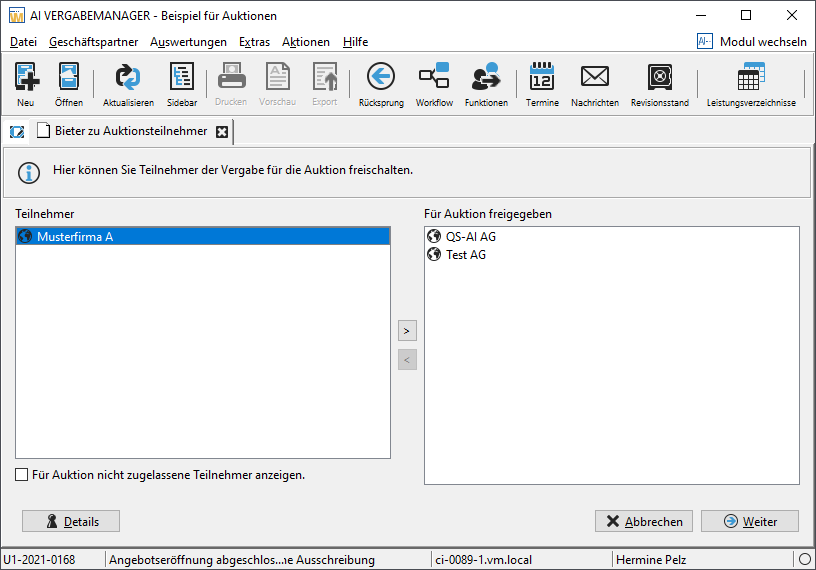
Select the participants on the left side and click on the small right arrow in the middle of the window. The entry is displayed on the right side in the area of the released participants. You can also display the participants excluded in the previous check by activating the Display participants not admitted to auction check box.
Once you have made your selection, click on Next > to enter the data for the new auction round.
Entering and publishing the auction round
In this workflow step, all the required data for the new auction round is entered and transferred to the AI auction platform using the Transfer to platform button.
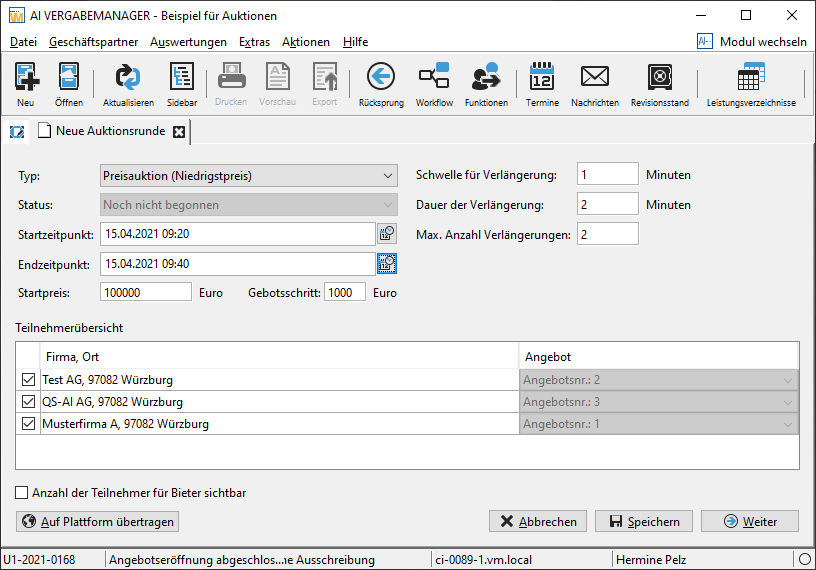
The following input fields are available for completion by default:
| Field | Description |
|---|---|
| Type | List field for selecting the auction type. |
| Status | Display field for the auction round status. |
| Start Time | Enter the start date of the auction in the format DD.MM.YYYY or select it using the miniature calendar |
| End Time | Enter the end date of the auction in the format DD.MM.YYYY or select it using the miniature calendar |
| Starting Price | Starting price of the auction in EURO. |
| Bid increment: minimum difference between bids in euros. | |
| Extension threshold | Time in minutes before the end date of the auction after which the auction round is considered to be over if no new bids are received. |
| Extension duration | number of minutes by which the auction is extended. |
| Max. number of extensions | Number of extensions. |
Auction Overview
After the auction round has been published, the contracting authority can use the overview dialog to follow the exact course of the auction. The Auction Information tab displays all important information about the current auction, as well as a list of all bids submitted by bidders and the time at which they were submitted.
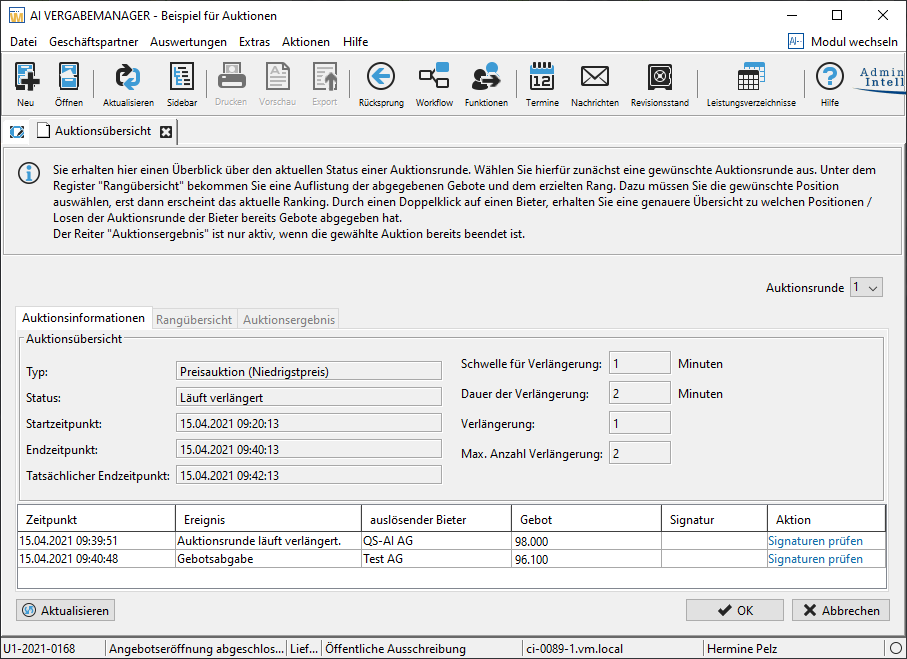
The Rank Overview tab shows the ranking of bids at the last time bidding closed. You can use the **Historical Back button to call up a ranking overview for each of the previous submission times during the auction round.
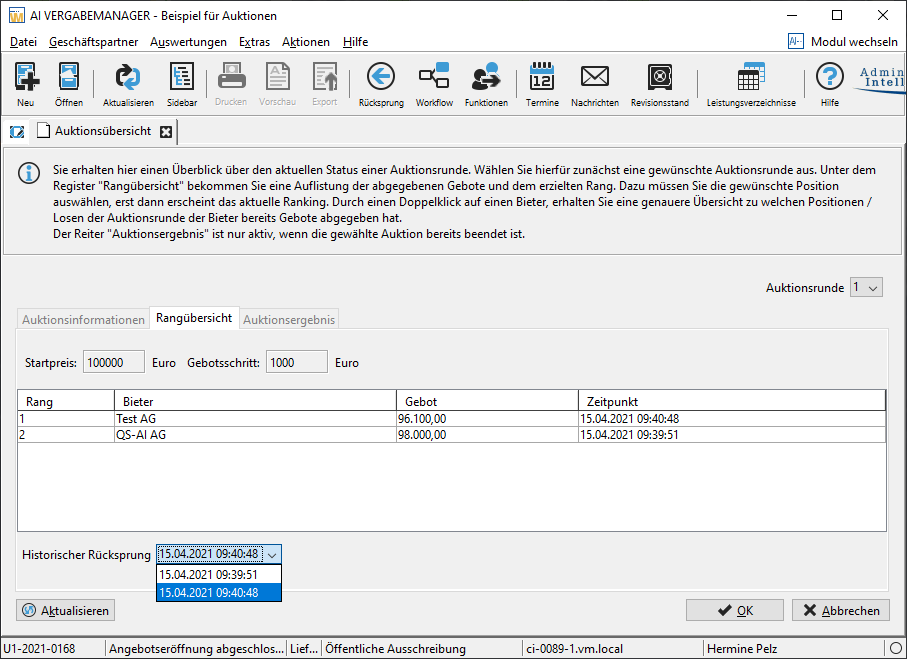
You can view information about auction rounds that have already ended. To do so, select an entry in the top right of the Auction round list.
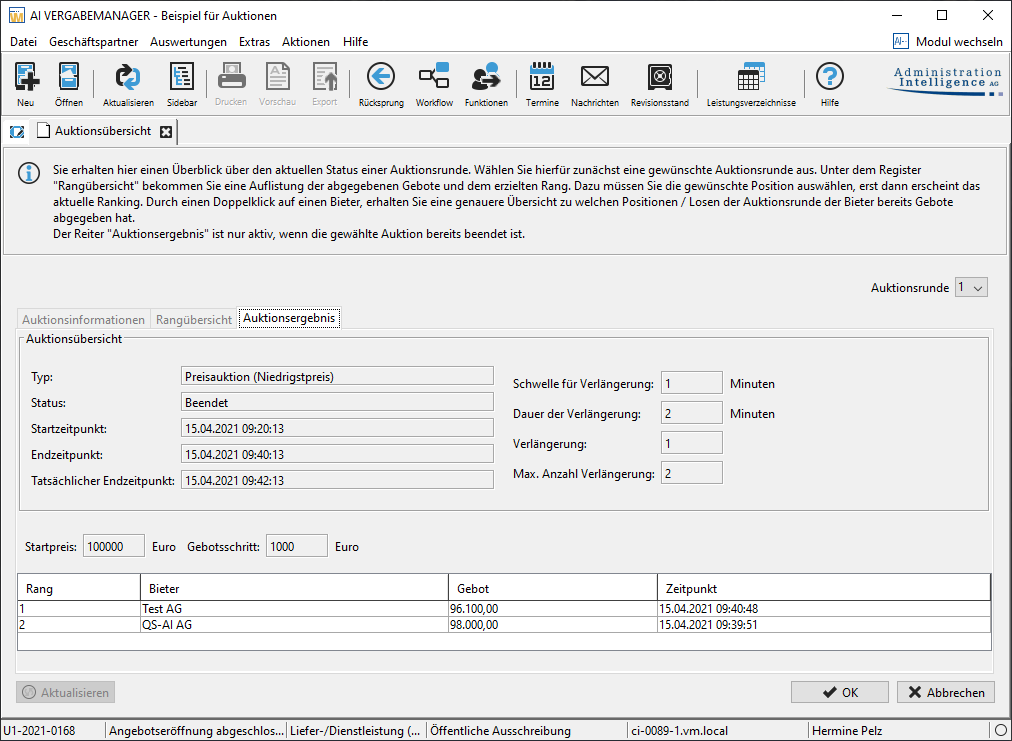
The Auction Result tab is only activated when the auction round has ended. It contains the final ranking of bids and other auction information and cannot be changed.