Import
When creating the bill of quantities, you can also access external files. AI TENDERINGMANAGER can import the following file formats:
| File | Format |
|---|---|
| AI bill of quantities | Program-specific import format (*.lv) |
| AI BQ-ASSISTANT file | AI BQ-ASSISTANT program import format (*.aidf) |
| AI MARKET file | AI MARKET purchasing platform import format (*.xml) |
| SAP SRM 4.0 file | SAP SRM import format (*.xml) |
| Microsoft Excel file | Import format of MICROSOFT EXCEL (*.xls and *.xlsx) |
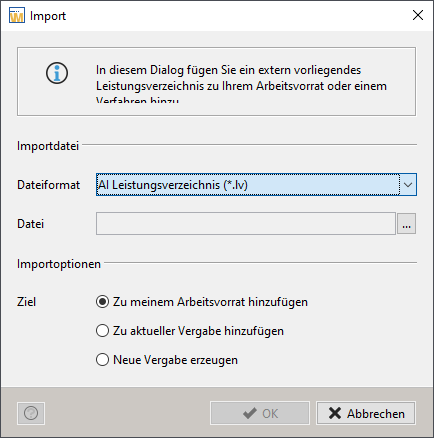
Select the menu command FILE - IMPORT - IMPORT BILL OF QUANTITIES.
The Import window opens.
 {align=center; width="600"}
Activate the radio button TO Current award procedures add. Select the desired file format from the file format list box and click the button with the three dots to select the import file.
Warning
To avoid errors when importing old bills of quantities, the version number of the import file is checked and a warning is issued if there are differences to the version of the existing award procedure. You can then carry out an automatic version correction and subsequently enter missing information. If this internal correction was not successful, you will receive a corresponding message and will have to contact your administrator.
The other import options have the following meaning:
Add to my worklist: Saves the import file in the My Worklist area. For more information on this topic, see the section Management of Bills of Quantity. - Create new award procedure: This creates a new award procedure that contains the imported BQ.
You can subsequently modify the imported bill of quantities if you have the corresponding user rights.
Importing an Excel spreadsheet
Tip
This function is only available to you if the customer model of your AI TENDERINGMANAGER has been customized accordingly.
With the help of the structured and flexible AI standard template for Excel import, which is provided to you, you can divide and enter your requirements into lots and positions in advance in an Excel table.

Info
After importing, the register tabs of the standard AI template are displayed as individual lots in the AI TENDERINGMANAGER bill of quantities and the respective table rows are displayed as individual items.
Click on the Insert Bill of Quantities button in the AI TENDERINGMANAGER toolbar.
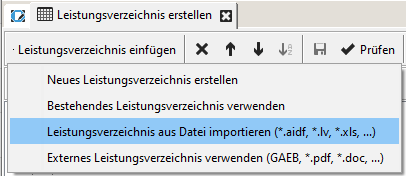
Select the entry Import bill of quantities from file (*AIDF, *.BQ, *.XLS) to start the import process. The BQ import window opens.
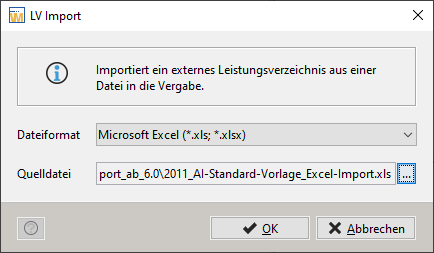
Select the entry Microsoft Excel (*.xls; *. xlsx) and click on the button with the three dots to the right of source file to select the import file.
Decide whether all or only certain lots should be imported into your award procedure.

Click on Done to end the import process.
Warning
Then check the bill of quantities for your award procedure in AI TENDERINGMANAGER and make any changes that may still be required here.
