Evaluation Scheme
To ensure that the services offered can be specifically reviewed and compared during the tender evaluation, you must create an evaluation scheme at bill of quantities or lot level. This defines all the criteria required to determine the most economical tender.
The AI TENDERINGMANAGER distinguishes between price and performance-related criteria. The price criterion is the standard criterion. The evaluation is calculated based on a possibly customer-specific formula from the bid or loss total. All other criteria are considered performance-related and are evaluated subjectively by the user. The performance criterion to be evaluated is freely selectable.
Info
If you have not defined an explicit evaluation scheme or have deleted the existing evaluation scheme, the AI TENDERINGMANAGER uses a standard evaluation scheme which only provides for a price-related evaluation.
Tip
Right-click on the bill of quantities to insert a new scoring scheme into your bill of quantities. In the context menu, select NEW - STANDARD VALUATION SCHEME. For more information on inserting a scoring scheme, see the section Editing bills of quantities.
Create Criterion
Select one of the following options to create a new criterion:
-
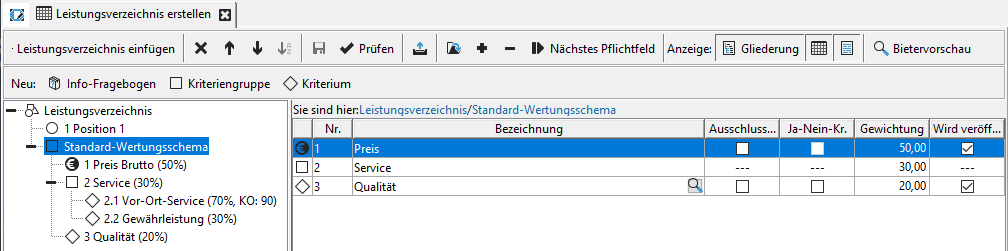
In the New toolbar (2), point to the Criterion button. The list of available criteria expands downwards. Select an entry.
-
In the Outline view (3), right-click on the Evaluation scheme. In the context menu, select NEW... - CRITERION.
-
The same context menu can also be called up by right-clicking on the table area (4).
The following input fields are available by default:
| Field | Description |
|---|---|
| No. | Number of the criterion in the scoring scheme. Is assigned automatically. |
| Description | Mandatory field: Short description of the criterion. Free text entry possible or select from the list by clicking on the magnifying glass symbol  . . |
| Attachments for further information on the award documents | Click on the paperclip symbol  to add a file attachment that contains further information on the criterion and becomes part of the award documents. to add a file attachment that contains further information on the criterion and becomes part of the award documents. |
| Publication? | The Yes option field is preset with Yes: Indicates whether the criterion will be published. |
| Exclusion criterion? | Option field prefilled with No: Indicates whether the criterion constitutes a reason for exclusion of the bidder in the event of non-fulfillment.Contains the addition "Exclusion criterion" in the description if Yes is selected. |
| Yes/No criterion? | The option field is preset with No: For this criterion, an offer can either receive all possible evaluation points or none at all. |
| Weighting in % | mandatory field : Value between 1 and 100. |
| Publish weighting? | The option field is preset with Yes: Specifies whether the weighting of the criterion is published if the criterion is also published. |
| Exclusion threshold in % | Number between 0 and 100: Specifies the value in percent from which the bid is excluded. Mandatory field if exclusion criterion is Yes. |
Create Criteria Group
If you have several criteria that can be summarized in terms of content, you can create a criteria group.
Select one of the following options to create a new criteria group in the evaluation scheme:
-
In the New toolbar (2), click on the Criteria group button.
-
In the Outline view (3), right-click on the Rating scheme icon or on another criteria group. In the context menu, select NEW... - CRITERIA GROUP.
-
The same context menu can also be called up by right-clicking on the table area (4).
The following input fields are available by default:
| Field | Description |
|---|---|
| Description | Mandatory field: Short description of the criteria group. |
| Weighting in % | Mandatory field: Value between 1 and 100. 50 is the default value. |
| Publish weighting? | The radio button is preset to Yes: Specifies whether the weighting of the criterion is published. |
Info
If you use several criteria, weight them as a percentage. The sum of the weighting of the criteria must be exactly 100% at each level.
Criteria with Question to the Bidder
In addition to the normal criteria, you can also add criteria to the evaluation scheme that include a Question to the bidder. Select the desired criterion from the toolbar. Below are a few examples:
| Criterion | Example question |
|---|---|
| Criterion with yes/no question | Will the minimum speed requirements be met? |
| Criterion with explanatory question | Describe the system structure. |
| Criterion with whole number question | How many people are employed in your company? |
| Criterion with question about | Floating point number How long is the switch-on delay of the offered device in seconds? |
| Criterion with question about currency amount | How much is the cost of a single license for subsequent purchase? |
| Criterion with question about percentage | What are the annual maintenance costs in %? |
| Criterion with question about fulfillment of requirements | Is the electronic signature supported by the software? Possible answers: Fully met/ Not met/ Fully met, additional functions/ Met after customization. |
Calculation Formulas in the AI Evaluation Scheme
In a standard evaluation scheme, the following calculation is carried out to determine the number of points achieved for the Price criterion for each bid:
The factor |minimum bid amount| stands for the positive amount of this number. This results in a calculated maximum score of 100 points. The bid totals are commercially rounded before calculation.
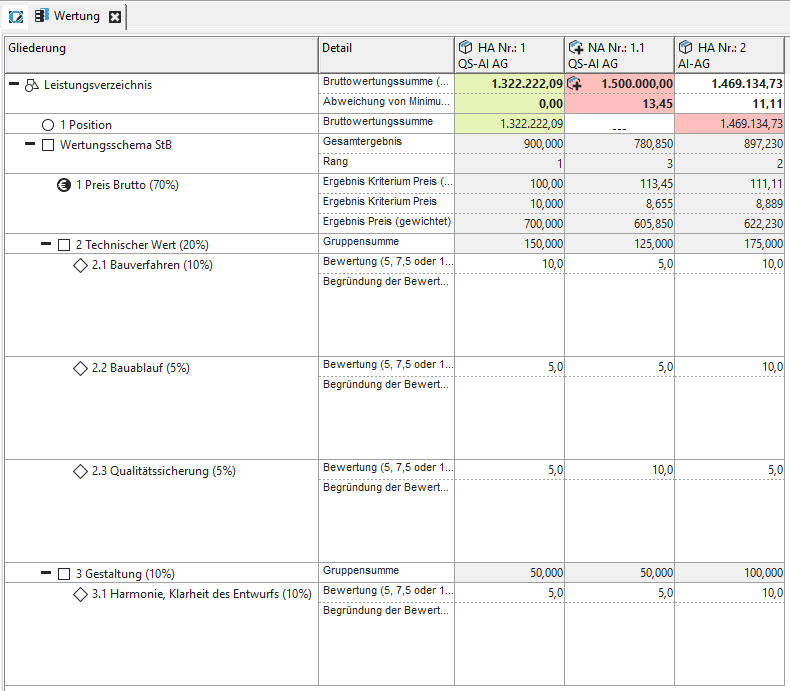
In an evaluation scheme that also contains individual criteria and groups of criteria with sub-criteria in addition to the price, the result of the evaluation is calculated as the sum of the weighted individual results at the top level of the evaluation scheme.
The formula for an evaluation scheme with the price criterion, an individual criterion and a criteria group with two criteria is shown below as an example.
Abbreviations
| Abbreviation | Meaning |
|---|---|
| P | Result criterion price (see formula above) |
| \(W_P\) | Weighting price criterion |
| \(C_{IC}\) | Criteria points single criterion |
| \(W_{IC}\) | Weighting of individual criterion |
| \(C_1\) | Criteria points criterion1 from criteria group |
| \(W_{C1}\) | Weighting criterion1 from criteria group |
| \(C_2\) | Criteria points criterion2 from criteria group |
| \(W_{C2}\) : | Weighting criterion2 from criteria group |
| \(W_G\) | Weighting criteria group |
For each additional individual criterion and each additional group of criteria at the highest level in the evaluation scheme, the formula is extended by a corresponding summand. The evaluation points of a group are calculated from the sum of all weighted evaluation results of the criteria within the group. It is possible to nest the groups, subgroups and criteria to any depth.
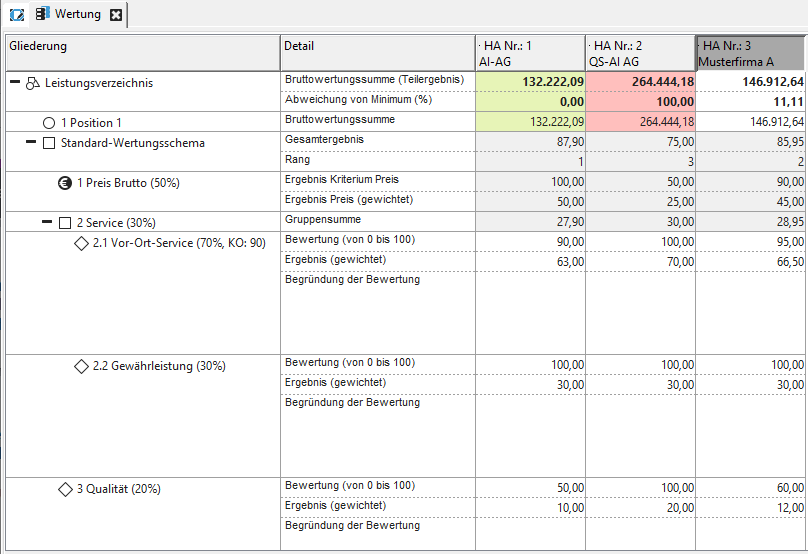
Numerical example with calculation steps for the main bid no. 3
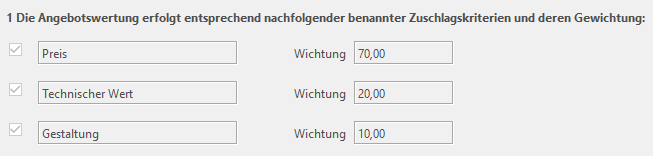
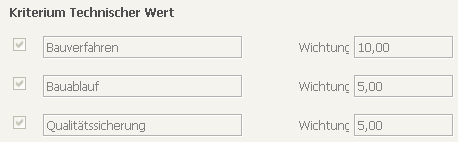
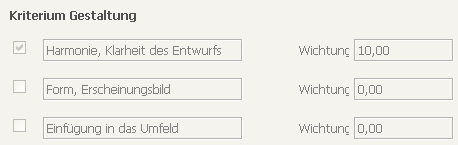
Scoring Scheme Configurable via Forms
If provided for in the customer model, you can also enter the structure of the bill of quantity via a form by assigning your own values to the form fields.
Info
This function is only available if the customer model of your AI TENDERINGMANAGER has been adapted accordingly.
An example of how to enter a complex valuation scheme by selecting and entering values in a corresponding form is shown here.